If you want a cleaner cabin and more useful charging up front, a dashboard USB port for Toyota Tacoma can be a simple upgrade. The best options blend flush-mount styling, dependable power, and the right connector layout for your devices.
Below, we focus on fit, charging speed, and ease of installation so you can quickly narrow down the best choice for daily driving, road trips, and work-truck use.
Best 10 Dashboard USB Port for Toyota Tacoma Picks for 2026
Fast-charge upgrade
Toyota PD QC3.0 Type-C USB Socket

- PD and QC3.0 fast-charging support
- LED indicators for easier nighttime use
- Built-in fuse protection for safer charging
Best For: Drivers who want a smaller Type-C dash charger with fast-charge support
Dual-port data pick
Toyota Dual USB 3.0 Flush Mount

- Two USB 3.0 ports in a dash flush-mount design
- About 10x faster transfer than USB 2.0
- 1 meter cable for DIY installation
Best For: DIY users who want dual front USB ports and faster data transfer
Basic replacement fit

- Sized for a 40 x 20 mm dash opening
- 12V-30V input with 5V 1.2A output
- Includes overheat, overcurrent, and overcharge protection
Best For: Buyers who need a simple single-port replacement and already know their opening size
Best for Easy Setup
Toyota Flush Mount USB 2.0 Dash Port

- Factory-like flush fit for a clean dash look
- USB 2.0 supports charging and data transfer
- Clip-in install with compact rear cable design
Best For: Tacoma owners who want a tidy OEM-style USB dash replacement
Best for Everyday Use
Dual PD and QC3.0 Toyota Dash Charger

- USB-C PD and QC3.0 USB-A fast charging
- Charges two devices simultaneously
- Built-in 10A fuse with blue LED voltmeter
Best For: Tacoma drivers who want a fast dual-port charging upgrade
Flush Extension Adapter
Toyota USB Male-to-Female Dash Socket

- Flush-mount extension fits a 34 x 23 mm opening
- USB 2.0 supports charging and data transfer
- 25 cm cable with overheating and overcurrent protection
Best For: Anyone wanting a simple flush USB extension for the dash
OEM-Style Dual-USB Upgrade
Toyota Tacoma Dual USB-C + USB-A Charger

- USB-C PD and USB-A QC3.0 in one panel
- Plug-and-play wire cable kit included
- Fits Tacoma 2005-2022 with 40×22×56.2mm opening
Best For: Tacoma owners who want a factory-style dash USB upgrade with both USB-C and USB-A charging.
Voltmeter Dash Port Pick
Anina Dual USB Toyota Flush Mount
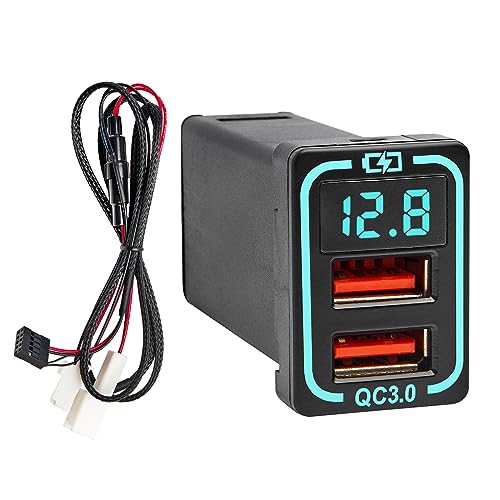
- Blue LED voltmeter gives real-time voltage readout
- Dual USB ports with 18W total output
- Fits Toyota dash openings sized 34×23 mm
Best For: Tacoma and other Toyota owners who want a dash USB socket with a digital voltmeter.
Fast-Charge Factory-Style Port
Toyota Tacoma QC3.0 Dual USB Socket
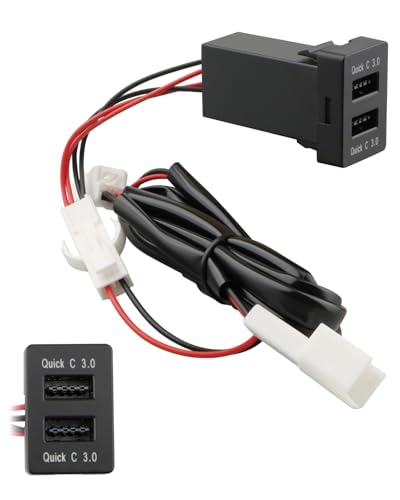
- Dual QC3.0 ports for fast charging
- Direct replacement for pre-installed Toyota dash locations
- Fits Tacoma 2011+; 2012-2014 center mounting only
Best For: Tacoma owners who want a fast-charging replacement port that keeps a factory-style appearance.
OEM-style flush fit – Toyota 1.57×0.87 USB Dash Port
If you want a dashboard USB port for Toyota Tacoma that replaces a factory blank with a clean flush-mount look, this Anina adapter is built around a 1.57″ x 0.87″ opening. It’s a practical pick for Tacoma and other compatible Toyota models when you need a simple USB extension for charging and data on the dash.
Best For: Tacoma owners who want a square OEM-style USB replacement with a flush install.
Pros:
- Fits the listed 1.57″ x 0.87″ hole size for a flush dashboard installation.
- USB 2.0 connection supports charging and data transmission for devices like phones, tablets, and GPS units.
- Includes built-in protection against overheating, overcurrent, and overcharging.
- Uses a 9.84-inch cable and is designed for plug-and-play replacement use.
Cons:
- Only works if your Tacoma’s opening matches the specified size.
- Output is listed at 5V 1.2A, so it is not a high-power fast charger.
Overall, this is a solid match for buyers prioritizing factory-like fit and simple USB functionality over maximum charging speed. Measuring the dash opening first is essential, but if the size lines up, it should be an easy replacement-style install.
Fast-charge upgrade – Toyota PD QC3.0 Type-C USB Socket
For a dashboard USB port for Toyota Tacoma that focuses on faster charging, this PD/QC3.0 socket is aimed at drivers who want a compact upgrade with modern charging support. It fits a smaller 1.3″ x 0.9″ mounting hole and includes LED illumination to make the socket easier to find at night.
Best For: Tacoma drivers who want a compact USB-C charging port with fast-charge support and LED visibility.
Pros:
- Supports PD and Qualcomm fast charging, including QC2.0/3.0 and FCP protocols.
- LED indicators help locate the socket in low light without being overly bright.
- Built-in fuse protection adds overcurrent, overcharge, and overheating safeguards.
- Can charge two devices at the same time.
Cons:
- Requires a mounting hole of about 1.3″ x 0.9″, so fitment must be checked carefully.
- The listing is aimed at Toyota special car charger applications, so compatibility depends on your dash opening and vehicle setup.
This is a good choice if your priority is faster charging rather than a basic USB extension. The LED and Type-C support make it feel more current, but exact fit remains the key thing to verify before buying.
Dual-port data pick – Toyota Dual USB 3.0 Flush Mount
If you’re looking for a dashboard USB port for Toyota Tacoma that emphasizes data speed and a dual-port layout, this flush-mount USB 3.0 extension is worth a look. It’s designed for dash blank-button installation and uses a 1.3″ x 0.86″ x 2.15″ fit profile, making it a DIY-friendly option for compatible Toyota interiors.
Best For: Tacoma owners who want two USB 3.0 ports and faster data transfer from a dash-mounted extension.
Pros:
- Dual USB 3.0 ports offer a more flexible layout than single-port adapters.
- USB 3.0 transfer speed is described as about 10 times faster than USB 2.0.
- Backward compatible with USB 2.0, USB 1.1, and USB 1.0.
- 1 meter cable length supports a dash-mounted installation to the car host.
Cons:
- Installation depends on matching the mounting-hole dimensions before purchase.
- It is designed for USB audio input/host connections, so it may not suit buyers who only want simple phone charging.
This is the strongest option here if your main goal is data performance and two front-facing ports. It makes the most sense for buyers comfortable with a DIY install and who need a dashboard-facing USB solution rather than a basic charger.
Basic replacement fit – Toyota VIGO 40×20 USB Port
For a basic dashboard USB port for Toyota Tacoma owners who need a straightforward replacement-style adapter, this MOTONG unit keeps things simple. It is made for a 40 x 20 mm opening and focuses on USB charging with built-in protection, so it’s best suited to buyers who want function over extras.
Best For: Drivers needing a simple 40 x 20 mm USB socket replacement with basic charging protection.
Pros:
- Fits a 40 x 20 mm dashboard hole, which is clearly specified in the listing.
- Provides 12V-30V input and 5V 1.2A USB output for standard charging.
- Includes overheat, overcurrent, and overcharging protection.
- Easy-install male-to-female USB cable design.
Cons:
- The listing specifically warns that it is sized for Toyota VIGO, so Tacoma fitment must be confirmed carefully.
- It is a single-port, basic-output unit rather than a fast-charging upgrade.
This is the most no-frills choice in the group and makes sense if your dash opening matches the size exactly. Because the fit guidance is narrow, buyers should measure first and treat it as a size-driven replacement, not a universal Toyota port.
Best for Easy Setup – Toyota Flush Mount USB 2.0 Dash Port
If you want a dashboard usb port for toyota tacoma that looks factory-installed, this OEM-style flush fit USB 2.0 socket is built for a clean dash integration. It supports charging and data transfer, uses a compact rear cable design, and is aimed at drivers who want a neat replacement rather than a bulky add-on.
Best For: Tacoma owners who want a flush, factory-like USB dash replacement with charging and data support.
Pros:
- OEM-style flush mount creates a factory-like look in the dash
- Supports both charging and data transfer functions
- Clip-in installation with a compact rear cable for flexible positioning
- Built for stable connection and resistance to daily vibration
Cons:
- Fitment is Toyota-focused, so compatibility should be checked carefully
- USB 2.0 speeds are basic compared with newer charging-focused ports
Overall, this is a practical choice if appearance matters as much as function. It is best suited to replacing an existing dash port with something that blends in cleanly and keeps the cabin looking original.
Best for Everyday Use – Dual PD and QC3.0 Toyota Dash Charger
For a dashboard usb port for toyota tacoma that focuses on faster charging, this dual-port adapter adds both USB-C PD and QC3.0 USB-A output in a compact dash-mounted format. It is designed for selected Toyota vehicles, includes a built-in 10A fuse, and adds a blue LED voltmeter so you can check voltage at a glance.
Best For: Tacoma drivers who want a dual-port dash charger with USB-C PD, fast USB-A charging, and a voltmeter display.
Pros:
- Dual ports let you charge two devices at the same time
- USB-C PD and QC3.0 support faster charging options
- Built-in 10A fuse and overload, overvoltage, and short-circuit protection
- Blue LED voltmeter helps confirm connection and find the port in the dark
Cons:
- Fitment is limited to selected Toyota vehicles and central mount use
- Users should confirm it snaps into the holder before buying
This is the strongest option here if charging speed and convenience are the priority. It gives you modern USB-C support without giving up a dash-mounted factory-style install.
Flush Extension Adapter – Toyota USB Male-to-Female Dash Socket
If you need a dashboard usb port for toyota tacoma as a flush-mount extension rather than a full charger, this male-to-female adapter is a simple OEM-spec style option. It offers USB 2.0 data transfer and device charging through a 25 cm cable, and it is made to fit a 34 x 23 mm dash opening.
Best For: Drivers who want a straightforward flush USB extension for dash data and charging access.
Pros:
- Flush mount design fits a 34 x 23 mm opening
- USB 2.0 supports charging and data transfer
- 25 cm extension cable gives flexible placement
- Protects against overheating, overcurrent, and overcharging
Cons:
- Output is limited to 5V/1.2A, so it is not a fast charger
- Fitment is broad but still depends on the correct dash hole size
This is a good pick when you mainly want convenient USB access in a clean, flush-mounted form. It is especially useful if you are replacing an old port or adding a simple extension for CarPlay, Android Auto, and general USB accessories.
OEM-Style Dual-USB Upgrade – Toyota Tacoma Dual USB-C + USB-A Charger
If you want a dashboard USB port for Toyota Tacoma that feels closer to an OEM upgrade, this dual-port charger is built around a flush-fit 40×22×56.2mm design and supports plug-and-play installation. It adds USB-C PD and USB-A QC3.0 charging in one panel, making it a practical pick for Tacoma owners who want modern charging without changing the factory look.
Best For: Tacoma drivers who want a factory-style dash USB upgrade with both USB-C and USB-A charging.
Pros:
- USB-C PD plus USB-A QC3.0 supports two-device charging.
- Includes a plug-and-play wire cable kit for easier installation.
- LED indicator helps with visibility in low light.
- Wide Toyota fitment list includes Tacoma 2005-2022.
Cons:
- Requires checking the 40×22×56.2mm opening before ordering.
- Installation notes mention a fuse box must be installed in series.
Overall, this is a strong choice if you need a clean-looking dashboard USB port for Toyota Tacoma and want faster charging plus a modern USB-C option. Just verify the slot size first so the flush-mount fit works as intended.
Voltmeter Dash Port Pick – Anina Dual USB Toyota Flush Mount
This dashboard USB port for Toyota Tacoma is aimed at drivers who want a flush-mount USB replacement with built-in charging and a real-time voltage display. It uses a cigarette-lighter-powered extension cable and is listed for Toyota models with a 34×23 mm opening, so it suits buyers replacing an existing dash port or blank slot.
Best For: Tacoma and other Toyota owners who want a dash USB socket with a digital voltmeter.
Pros:
- Blue LED voltmeter shows real-time voltage when powered.
- Dual USB output supports two devices at once.
- 4 ft extension cable gives more flexibility for routing.
- 10A fuse adds protection against common electrical issues.
Cons:
- Fitment depends on a 34×23 mm dash opening.
- Listed charging output is 18W, so it is not the fastest option here.
For drivers who value monitoring and a near-factory appearance, this is a useful Tacoma dash USB upgrade. It stands out for the built-in voltmeter, but the opening size and 18W output should be checked against your needs.
Fast-Charge Factory-Style Port – Toyota Tacoma QC3.0 Dual USB Socket
For shoppers comparing a dashboard USB port for Toyota Tacoma, this QC3.0 dual USB socket is designed as a direct replacement for pre-installed mounting locations. It supports Tacoma 2011 and newer, with a note that 2012-2014 Tacoma models use the center mounting position only, and it aims to keep the original dash layout while adding quick charging.
Best For: Tacoma owners who want a fast-charging replacement port that keeps a factory-style appearance.
Pros:
- Dual QC3.0 ports support fast charging for compatible devices.
- Designed for direct replacement of existing mounted accessories.
- Fits Tacoma 2011 and newer, with clear mounting guidance for 2012-2014 models.
- Made of durable, wear-resistant plastic.
Cons:
- Requires a vehicle with the correct Type A dashboard switch mounting hole.
- Fit is limited to specified pre-installed mounting locations.
This is a practical option if you want a Tacoma dash USB upgrade that looks integrated and prioritizes charging speed. The main strength is the dual QC3.0 setup, but the correct mounting hole is essential for a clean install.
How We Picked the Best Dashboard USB Port for Toyota Tacoma
For this roundup, we prioritized products that match the Dashboard USB Port for Toyota Tacoma use case: OEM-style fit, reliable charging performance, and practical installation. We also looked for clear size specifications, Tacoma-compatible mounting styles, and useful features like USB-C, QC3.0, PD, and dual-port layouts.
We gave extra attention to durability and compatibility because a dash-mounted charger should feel integrated, not like an add-on. Products with ambiguous fit or incomplete charging details were ranked more cautiously.
Quick Comparison
The main differences come down to port type and charging speed. Basic USB 2.0 and USB-A options are best for simple phone charging or accessory power. USB 3.0 and QC3.0 models offer faster output for many smartphones, while USB-C PD models are better if you want a more modern, future-proof setup. Dual-port designs are usually the most flexible if you regularly charge two devices at once.
In size-sensitive dash applications, the exact panel cutout and flush-mount dimensions matter as much as the charging standard. If you are replacing an OEM-style opening, make sure the socket dimensions line up before buying.
Key Buying Factors for Dashboard USB Port for Toyota Tacoma
Fit and Cutout Size
Check the opening size, bezel dimensions, and mounting depth. A Dashboard USB Port for Toyota Tacoma should sit flush or nearly flush without forcing the panel.
Charging Standard
Choose USB-A, USB-C, or a combo model based on your devices. PD is ideal for newer phones and tablets, while QC3.0 remains a strong choice for fast charging older USB-A devices.
Power Source and Wiring
Some units connect through an existing cigarette lighter circuit, while others use a panel extension or replacement socket format. Match the wiring style to your installation comfort level and your truck’s available power source.
Use Case
If you only need a tidy place to charge a phone, a simple USB-A port may be enough. If you want one port for phone charging and another for passengers or tablets, a dual-port PD/QC model is usually the smarter buy.
Who Should Buy Which Dashboard USB Port for Toyota Tacoma?
Buy a basic OEM-style USB 2.0 or USB-A port if you want the simplest fit and only occasional charging. Choose a USB 3.0 or QC3.0 option if faster charging matters and you use modern phones every day. Pick a USB-C PD combo if you want the most versatile Dashboard USB Port for Toyota Tacoma and expect to keep the truck for years.
If you share the truck or charge multiple devices on the road, a dual-port setup is the best all-around option. If clean appearance is your top priority, favor flush-mount designs with clearly stated dimensions and a factory-like finish.